Beware of Fake CAPTCHA
CAPTCHAs tests help stop bots, but criminals can exploit them to take control of your device and steal your identity.
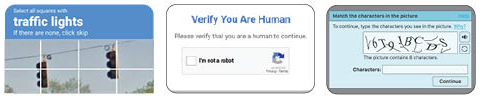
You’ve likely seen legitimate CAPTCHA widgets.
They help websites verify you are a human by asking you to check a box or select specific images.
Beware of fake CAPTCHA that include verification steps.
Threat actors are distributing malware through fake CAPTCHA tests to trick users into executing malicious code on their device. Once executed, this code can download malware that steals passwords, browser cookies, and personal and financial information.
How the Scam Works
Scammers add so-called “verification steps” to trick users into running malicious
codes. Steps may include instructions such as:
• Press Win + R to open the Run dialog. • Press CTRL + V to paste a command
• Type Terminal and press return. • Paste CTRL + V into Terminal
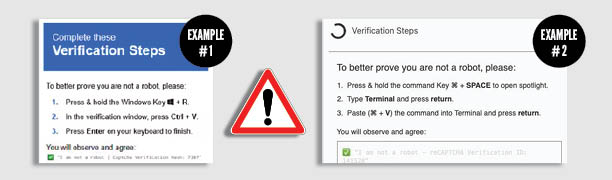
DO NOT FOLLOW THESE INSTRUCTIONS!
They may lead to malware being downloaded and installed on your device.
Protect Yourself
• Legitimate CAPTCHAs will never ask you to copy and paste commands.
• Simply visiting a site with CAPTCHA or clicking the “Verify you are human checkbox”
will NOT install malware.
What to Watch For
• Avoid suspicious CAPTCHAs: Be cautious of verification prompts on unexpected sites or apps—especially those asking for extra steps.
• Don’t run copied commands: Never copy and paste code from a website. Real verification processes won’t require it.
• Watch for unusual prompts: Requests to open Run, Command Prompt, or PowerShell are red flags.
• Keep systems updated: Regular updates help protect against known vulnerabilities.
If You Spot a Fake CAPTCHA
Take a screenshot of the CAPTCHA or error message and report it to security@uh.edu, including any actions you may have taken. If you accessed the site through a link in an email, use the “Report Message” button in Outlook.
Staying alert helps protect both you and UH from emerging cyber threats.